Provider-agnostic by design
Claude, Codex, OpenCode, or any terminal-based model — working together toward a single shared goal. No vendor lock-in.
The AI development console
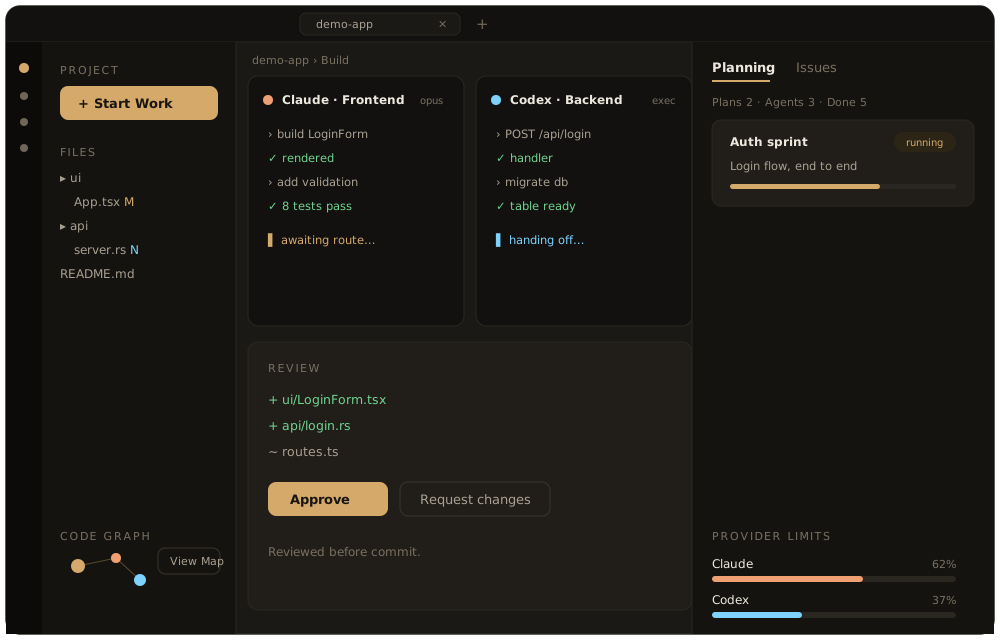
A desktop console for running AI coding agents as a coordinated team — with any terminal-based model, and your code kept on your machine.
Features
Claude, Codex, OpenCode, or any terminal-based model — working together toward a single shared goal. No vendor lock-in.
Agents operate with real project context, not assumptions.
Every change is presented for review before anything is committed.
Set each agent's autonomy and permissions, and stay in control of the work.
Your code stays on your device unless you choose to share it.
What's inside
Coordinate engineering, QA, security, and project-manager agents around one goal.
Define agent roles and prompts that match how your team actually ships.
Move across related repos and worktrees without losing the plan.
Open the running app, inspect the result, and capture evidence directly.
Mark up visual bugs and hand the context to the right agent.
Break large work into feature plans, sprint queues, and clear handoffs.
Track, triage, and resolve issues without leaving the console.
Branch, commit, review, and sync through the normal development flow.
Keep provider usage visible while agents work.
Pricing
Every feature is included on both plans. Choose annual to save two months.
Plan
Each license permits one active installation; deactivate to move to another machine.
Launch access
Join the waitlist and we'll email you the moment Harmony Code opens.
Launch access
We'll email a private checkout link when access opens. No charge until you subscribe.